Aegis
Aegis 🛡️




Aegis deploys and supervises apps on your own server. A single Rust daemon with embedded SQLite gives you health-checked deploys with automatic rollback, process supervision, a web dashboard and an HTTP API.
[!NOTE] Aegis is pre-1.0 and early. Deploys, rollbacks, the HTTP API, the dashboard and resource limits are tested in CI on Linux; there are no production results yet. Benchmarks and a soak test run in CI on shared GitHub runners; see benchmarks and soak tests for what they do and don’t show. See the scorecard and feature maturity.
curl -fsSL https://raw.githubusercontent.com/shivam411/Aegis/main/install.sh | bash
✨ Features
| Feature | Description |
|---|---|
| ⚡ Single Binary | Daemon with embedded SQLite. No PostgreSQL, Redis, or Docker required. |
| 🚀 Safe Deployments | Build in isolation (a failed build never touches the live app), health-check the new release, and roll back automatically if it doesn’t come up. Fully zero-downtime cutover needs the planned reverse proxy (roadmap). |
| 🧹 Automated Version Retention | Keeps the last N releases on disk (default: 2). Older versions auto-pruned after each deploy. |
| ⏰ Scheduled Auto-Deployments | Background scheduler triggers builds at specific daily hours (e.g. 02:00 AM). |
| 🛠️ Runtime Detection | Detects Node.js, Rust, Go, Python, Bun, Deno from project files. CI deploys Node.js apps; other stacks aren’t deploy-tested yet. |
| 🖥️ Terminal Dashboard (experimental) | aegis-tui is a keyboard-driven terminal dashboard: apps with status, uptime, restarts and CPU/memory; releases, deployments and live logs per app; a filterable live event stream; and confirmed start/stop/restart, deploy and rollback. |
| 🔒 Event-Sourced Audit Trail | Every mutation is an immutable domain event. Full replay on startup. |
| 🔄 Instant Rollbacks | Roll back to any retained release without rebuilding from source. |
| 🎛️ Live Resource Limits | Per-app CPU and memory limits with Linux cgroups (v2 or v1), changed from dashboard sliders without restarting the app. Live and 7-day charts, OOM and throttling alerts. |
| 🌐 Web Dashboard | Deploy, roll back, stream logs, watch resources and audit everything from the browser. |
| 🧪 Jobs & Live URL Check | Cron and on-demand commands in the live release; after a deploy Aegis requests your URL and rolls back (keeping the HTTP status) if it isn’t up. |
| 📈 Prometheus & Grafana (opt-in) | Switch on /metrics from the dashboard and import the ready-made Grafana dashboard. |
| 👥 Users, Roles & App Access | Viewer, deployer and admin accounts; limit an account to a list of apps (or all), and hide sensitive apps behind a password. |
| 🔌 Notifications & Webhooks | Slack alerts for failed deploys, crashes and resource pressure; signed GitHub push webhooks trigger deploys. |
📦 Installation
One-Line Installer (Linux & macOS)
curl -fsSL https://raw.githubusercontent.com/shivam411/Aegis/main/install.sh | bash
The installer automatically detects your OS and CPU architecture, downloads the latest release from GitHub, and installs to ~/.local/bin/. The CLI binary is aegis-cli; the installer also links aegis to it, which is the name used in these docs (both work).
Manual Download
Download the latest binary for your platform from GitHub Releases:
| Platform | Archive |
|---|---|
| Linux x86_64 | aegis-linux-amd64.tar.gz |
| Linux ARM64 | aegis-linux-arm64.tar.gz |
| macOS x86_64 | aegis-darwin-amd64.tar.gz |
| macOS ARM64 (Apple Silicon) | aegis-darwin-arm64.tar.gz |
| Windows x86_64 | aegis-windows-amd64.zip |
tar -xzf aegis-linux-amd64.tar.gz
mv aegis-daemon aegis-cli aegis-tui ~/.local/bin/
ln -sfn aegis-cli ~/.local/bin/aegis    # optional: the name the docs use
Build from Source
git clone https://github.com/shivam411/Aegis.git
cd Aegis
cargo build --release
cp target/release/aegis-daemon target/release/aegis-cli target/release/aegis-tui ~/.local/bin/
ln -sfn aegis-cli ~/.local/bin/aegis
Requires Rust 1.75+, SQLite3, and protoc.
🚀 Quickstart
# 1. Initialize project in your repository
aegis init

# 2. Verify project configuration
aegis validate

# 3. Build, health-check and deploy (rolls back automatically on failure)
aegis deploy

# 4. Follow the app's output
aegis logs -f

# 5. Roll back if needed
aegis rollback
See what is tested today on the Scorecard.
📊 Feature Maturity
Features are tiered as Experimental, Validated (tested in CI), Dogfooded or Production Proven. No feature is Dogfooded or Production Proven yet. Full list with links to the tests: docs/feature_maturity.md.
| Feature / Capability | Maturity Level | Evidence |
|---|---|---|
| Deploy pipeline, health checks, automatic and manual rollback | 🟡 Validated | lifecycle.rs, e2e-smoke.sh |
| Process supervisor, logs, daemon restart recovery | 🟡 Validated | runtime/process tests, e2e-smoke.sh |
| Event store & event bus | 🟡 Validated | core/event_store tests |
| HTTP API, auth, API tokens, TLS, GitHub webhooks | 🟡 Validated | core/web/tests/ |
| Web dashboard | 🟡 Validated | ui-tests/tests/ (Playwright) |
| Live CPU/memory limits (cgroup v2) | 🟡 Validated | kernel.rs, resources.spec.js |
PM2 & systemd migration (aegis migrate) |
🧪 Experimental | Minimal; untested |
replay, inspect --at, incident, investigate, upgrade |
🧪 Experimental | Placeholder output today; being reworked |
Templates for soak, chaos, performance, migration, compatibility and dogfooding reports are in validation/_templates/. None of those runs has been done yet.
🏗️ Architecture
Aegis follows CQRS-Lite event-sourcing principles. Commands mutate state by appending immutable events to SQLite. The EventBus broadcasts events to the ProjectionEngine for fast in-memory TUI rendering.
┌─────────────────┐       Command       ┌──────────────┐
│  CLI / TUI /    │ ──────────────────► │ Aegis Daemon │
│  Git Webhooks   │                     └──────┬───────┘
└─────────────────┘                            │
                                        (Emits Event)
                                               ▼
                                      ┌─────────────────┐
                                      │    Event Bus    │
                                      └────────┬────────┘
                    ┌──────────────────────────┼──────────────────────────┐
                    ▼                          ▼                          ▼
          ┌───────────────────┐      ┌───────────────────┐      ┌───────────────────┐
          │    Event Store    │      │ Projection Engine │      │  Plugin Manager   │
          │    (SQLite DB)    │      │(In-Memory Caches) │      │  (Slack / GitHub) │
          └───────────────────┘      └───────────────────┘      └───────────────────┘
7-Stage Build Pipeline
Clone → Install → Build → Test → Package → Verify → Promote
Each stage runs in an isolated build directory. If any stage fails, the live version remains untouched.
For a deep dive, see the Architecture Documentation.
💻 CLI Reference
| Command | Description |
|---|---|
aegis status |
Daemon version, project count, running apps |
aegis init |
Detect the runtime, write aegis.toml, register the project |
aegis validate |
Check aegis.toml and show the effective settings |
aegis deploy [project] |
Build and deploy, showing each stage; --release, --repo, --commit, --detach |
aegis rollback [project] |
Switch back to the previous (or --version) release without rebuilding |
aegis list |
Projects with status, live release, PID and restart count |
aegis logs [target] [-n N] [-f] |
App output (stdout, stderr and supervisor messages) |
aegis start / stop / restart [target] |
Control an app’s process; a stopped app stays stopped across daemon restarts |
aegis releases [project] |
Release history with status and commit |
aegis deployments [project] |
Deployment history with status, failing stage and reason |
aegis timeline [project] |
The project’s recent events |
aegis schedule |
Configure daily auto-deployment (--hour 0-23) |
aegis emit-event |
Emit a custom event to the event store |
aegis stream-events |
Stream live event bus notifications |
target is a process id or a project id/name; without it, commands use the project in ./aegis.toml.
Web dashboard
With [web] enabled = true, open http://127.0.0.1:8420/ (through an SSH tunnel, a reverse proxy, or built-in TLS) and sign in as admin. From the browser you can:
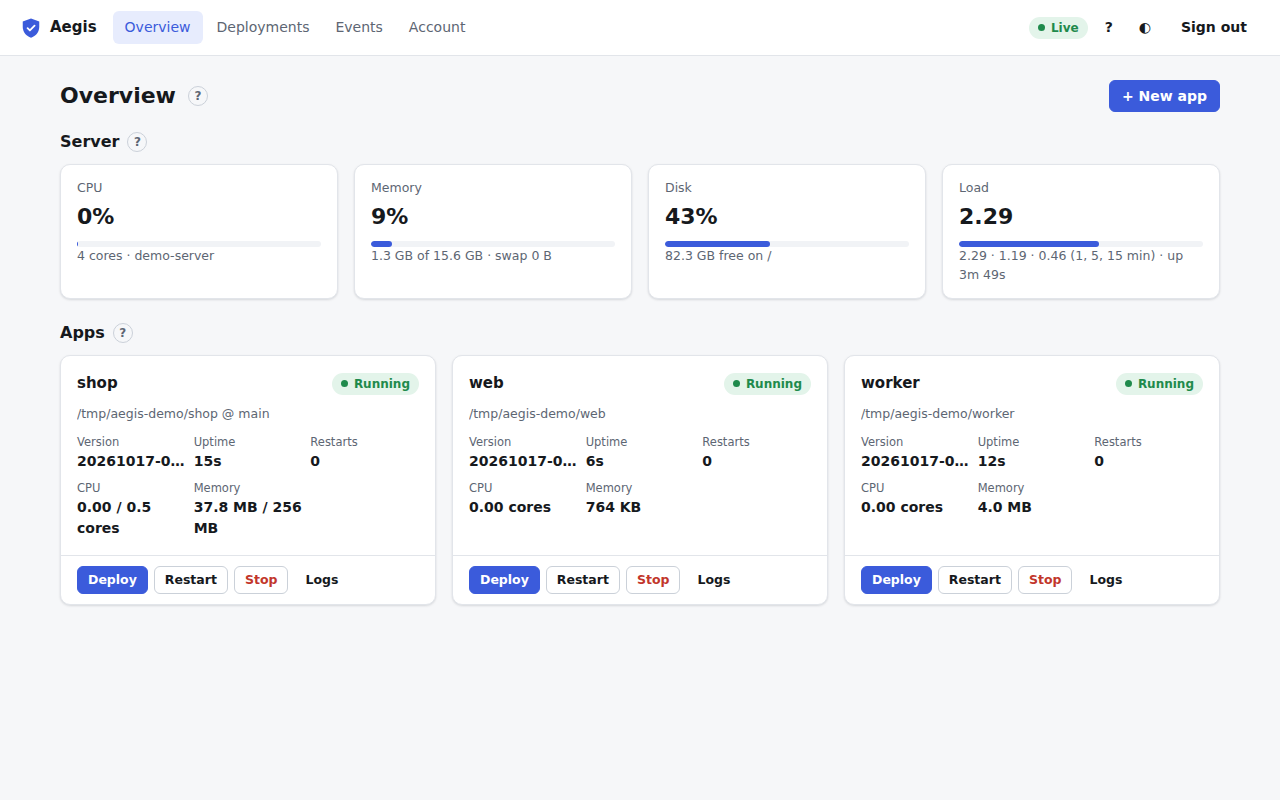
- Overview: host CPU, memory, disk and load, plus every app’s status, version, uptime and restarts.
- Deploy: choose a branch, commit and strategy, and watch the 7-stage pipeline and build log live.
- Operate: start, stop and restart apps, and roll back from the release history.
- Logs: follow, pause, search and download live logs.
- Audit: browse the deployments timeline and a filterable event log showing who did what.
- Add apps: a wizard goes from repo URL to auto-detected settings to a first deploy.
- Resources: watch live and historical CPU and memory for each app, with its limit drawn on the chart. Drag the CPU and memory sliders to change limits on the running app with no restart. See when an app is throttled or killed for running out of memory.
- Manage: edit app settings, set daily schedules, create webhook secrets and API tokens.
The dashboard has light and dark themes, works on a phone, and has keyboard shortcuts (press ?). New users get a short guided tour, and every section has a ? button that explains it. The dashboard guide walks through every page with screenshots.
HTTP API
Set [web] enabled = true and the daemon also serves an authenticated JSON API, with live Server-Sent Events, on 127.0.0.1:8420. Sign in as admin (the first password is in <data_dir>/initial-admin-password) or use API tokens. Reach it through an SSH tunnel, a reverse proxy with HTTPS, or built-in TLS. See docs/http_api.md, docs/security.md and docs/openapi.json.
Server install
curl -fsSL https://raw.githubusercontent.com/shivam411/Aegis/main/install.sh | sudo bash -s -- --server
This installs Aegis as a hardened systemd service running as a dedicated aegis user, with the web API enabled on loopback. Add --domain aegis.example.com to prepare it for a reverse proxy such as Caddy.
⚙️ Configuration
Aegis reads aegis.toml from the working directory:
[daemon]
host = "127.0.0.1"
port = 50051
database_path = "aegis.db"
log_level = "info"
max_retained_versions = 2
🗺️ Roadmap
[!NOTE] Aegis is pre-1.0 and has not had a beta yet. New architectural changes follow the RFC Process. Summary:
public_roadmap.md; detailed plan:roadmap_web_control_plane.md.
| Phase | Scope | Status |
|---|---|---|
| 0–1 | Real deploys, health checks, rollback, supervision; HTTP API | ✅ Shipped (tested in CI) |
| 2 | Authentication, TLS, GitHub webhooks, hardened server install | ✅ Shipped (tested in CI) |
| 3–4 | Web dashboard; live CPU/memory monitoring and limits | ✅ Shipped (tested in CI) |
| 5 | Env vars and secrets, domains + reverse proxy + TLS, webhook setup and config-as-code in the UI | ▶ Now |
| 6 | Users and roles, backup/restore, self-update, terminal UI, Docker runtime | 📅 Next |
| Later | Multi-node fleet | 📅 Planned |
Not yet measured: production use, soaks longer than a few hours, performance on real hardware, and migration accuracy. Benchmarks and 5/60-minute soaks run in CI (benchmarks.md). See the scorecard.
🛠️ Development
git clone https://github.com/shivam411/Aegis.git
cd Aegis

cargo check --workspace          # Compile check
cargo test --workspace           # Run all tests
cargo clippy --workspace         # Lint
cargo fmt --all                  # Format

# Dashboard browser tests (needs Node 18+; uses a debug build of the daemon)
cargo build -p aegis-daemon
cd ui-tests && npm ci && npx playwright install chromium && npx playwright test
Repository Layout
Aegis/
├── core/           # Daemon, config, event store, projection, scheduler
├── deployment/     # Release, builder, strategy, health, rollback
├── runtime/        # Process supervisor, polyglot engine, logs
├── git/            # Repository operations, webhooks
├── ui/             # CLI (clap + tonic), TUI (ratatui + crossterm)
├── integrations/   # Slack, GitHub, Docker plugins
├── docs/           # Documentation (GitHub Pages)
├── ui-tests/       # Playwright tests for the web dashboard
├── scripts/        # Uninstall helper and the end-to-end CI script
├── validation/     # Report templates (no results recorded yet)
├── install.sh      # One-line installer
└── .github/        # CI, release, and pages workflows
📄 License
Licensed under the MIT License.
Built with ❤️ in Rust.