Aegis
Settings tab
Tab 5 of the app page (5). Admins change how the app is built and run. Others see a View aegis.toml button and the read-only Environment card.
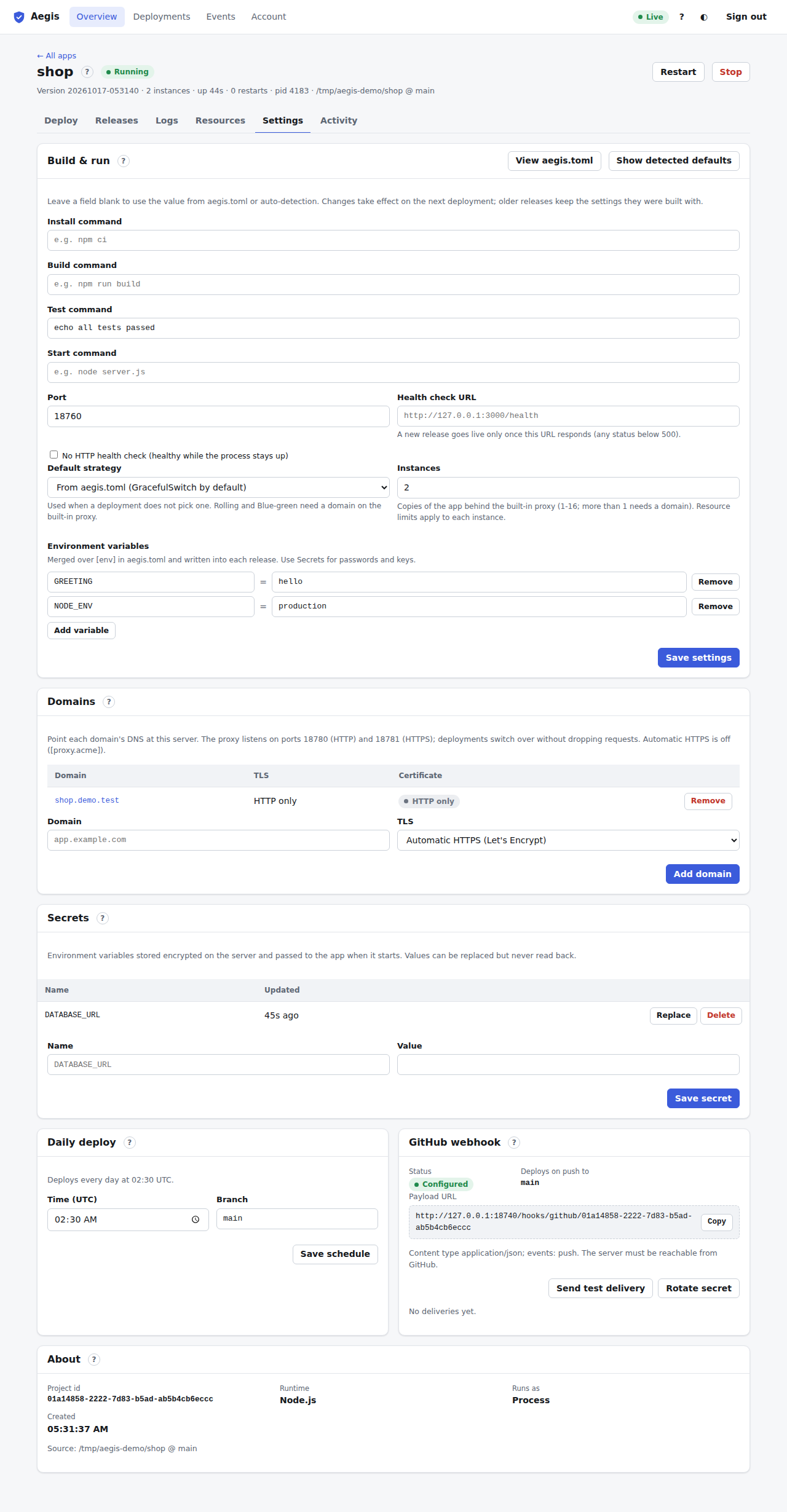
Build and run
A blank field means “use aegis.toml, or auto-detection”.
| Field | Meaning |
|---|---|
| Install / Build / Test / Start command | Shell commands for the pipeline stages and for starting the app. |
| Port | Where the app listens; also given as PORT. |
| Health check URL | Must answer below 500 before a release goes live. |
| No HTTP health check | Healthy while the process stays up. For workers without HTTP. |
| Default strategy | Used when a deployment picks none. Rolling and Blue-green need a domain on the built-in proxy (strategies). |
| Instances | Copies to run (1-16). More than one needs a domain on the built-in proxy. Limits apply per instance. |
| Health check timeout (seconds) | Time to become healthy (1-3600; [deploy] health_check_timeout_secs, default 30). If missed, the deployment fails and the previous release keeps serving. Raise it for slow starters. |
| Live URL check | Requested after go-live (e.g. your public domain). If not up within Timeout (default 30 s), the deployment rolls back and fails with the status seen (e.g. HTTP 502). Accepted statuses: 200 or a range like 200-399 (default 100-499). Check the URL now tests once; Check, and roll back if down also restores the previous release. A first deployment has nothing to roll back to: it stays live and fails the check. |
| Drain timeout (seconds) | Time for a stopping release to finish requests after SIGTERM before it is killed (0-3600; [deploy] drain_timeout_secs, default 10). Applies to releases built after the change. |
| Environment variables | NAME = value rows, merged over [env] in aegis.toml and the env file. Add variable / Remove. Use Secrets for passwords and keys. |
Card header:
- View aegis.toml: the file the next release gets (the app’s own file plus dashboard settings; never secrets). Copy to commit it.
- Show detected defaults: reruns auto-detection and shows its picks as placeholders.
Save settings shows an aegis.toml diff first; confirm in the dialog. Settings apply to the next deployment; built releases keep theirs. Dashboard settings win over aegis.toml. The form saves every field, so a blank field returns to the file’s value.
Hide the app
Admins only. Hide this app sets a password (12+ characters). The app vanishes from lists, search, events and graphs, and every request answers “not found”, until a session enters the password:
- Sign in, Overview → Unlock hidden app.
- Enter the app’s name and password. The app and a Hidden badge show until you sign out or Hide it now.
Your own session stays unlocked when you hide. A new password locks every session. Stop hiding removes it. The password is unrecoverable, so keep it in a password manager (shell admins can run aegis-daemon admin unhide-app --project <id>). API tokens, webhooks and schedules ignore hiding. To limit an account to some apps, use Account → Users → Apps.
Repository
Admins only. Where deployments get code (URL and branch, or directory, plus App folder for monorepos) and the deploy key for private repositories.
- Generate deploy key: Ed25519 pair. The private key stays on the server, encrypted, and is written to a temporary Aegis-only file while git runs. The card shows the public key (Copy), fingerprint (
SHA256:…) and creation time. - On GitHub: open the Add deploy key link (
https://github.com/<owner>/<repo>/settings/keys/new), title it (e.g.Aegis my-app), paste the key, leave Allow write access unticked, Add key. - Test access: runs
git ls-remotewith the key; shows git’s error and fix (key not added, wrong repository, unknown host key). - With a key,
https://github.com/…is cloned over SSH (git@github.com:…). Other HTTPS URLs and local directories can’t use keys. All deployments use the key (dashboard, CLI, webhooks, schedule). - Generate a new key replaces it (remove the old one on GitHub). Delete key removes it; private repositories then fail to deploy.
Change source
Change source switches between a Git repository (URL, Branch) and a Folder on this server (absolute path the daemon can read), with an optional App folder. Checked like a new app’s source. Save source confirms; it applies to the next deployment while the running release keeps serving. A blank branch keeps the current one. The deploy key is kept. Recorded as ProjectSourceChanged. CLI: aegis source <app> --repo URL [--branch B] or --dir PATH.
Environment
Where each variable comes from, plus the env file. All roles see it; only admins change it. Names only, never values.
- Precedence, lowest to highest: env file,
[env]inaegis.toml, Variables, Secrets, thenPORT(always set by Aegis). Builds get the env file,[env]and Variables, never Secrets. - The table shows Value from (winning source), Overrides (lower sources defining it) and Build (visible to builds).
PORTin the env file shows Set by Aegis and is ignored.
Env file
Env file path: absolute server path, typically the app’s old .env (e.g. /opt/github/my-app/.env). Save env file stores the path (blank removes it) and offers a restart. It is read at every build and start, never stored: edit it on the server, then restart (or deploy, for build values). Syntax and limits: configuration.
- The card says Readable with the variable count, or Not readable with the reason: permission denied (fix:
chgrp aegis/chmod 640), does not exist, not inside a directory allowed by [apps] env_file_dirs, or a syntax error with its line. - If env files are off, an administrator must set
[apps] env_file_dirs = ["/opt/github"]in the daemon configuration and restart Aegis. - While unreadable, builds and starts fail with that message rather than run without the values.
Import .env
Import .env… turns a .env into Variables and Secrets.
- Paste it, or pick a file (read in the browser, not uploaded).
- Preview parses it (errors name the line, never the value) and lists each name with Import as: Variable, Secret or Skip. Suggested Secret: names containing
KEY,SECRET,TOKEN,PASSWORD,PRIVATE,AUTHor similar, URLs with a password, multi-line values. Variable:NEXT_PUBLIC_*,VITE_*,REACT_APP_*, the rest. Skip:PORT. Existing names keep their type (exists as variable/secret). Multi-line values must be secrets. - Import saves them: Secrets encrypted, Variables in settings (next deployment). A secret replaces a Variable of the same name. Aegis offers a restart if secrets changed.
Values are never shown again, logged or put in events (Variables are part of settings).
Domains
Serve the app on your domain through the built-in reverse proxy.
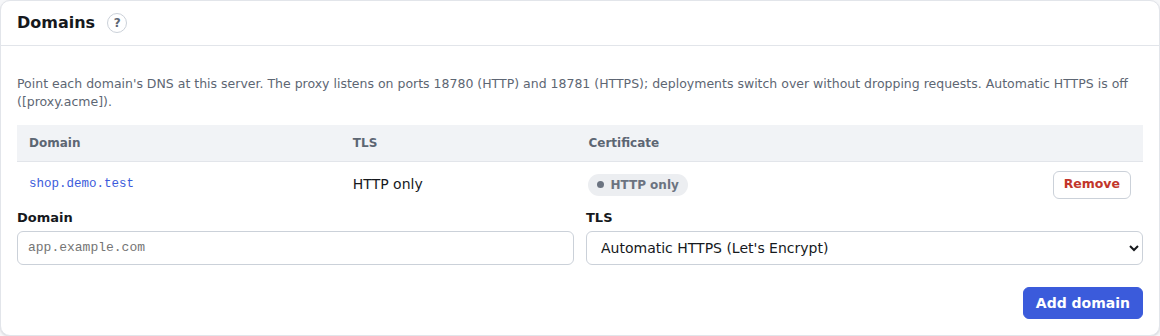
Quick add a subdomain: type the label (e.g. api), pick the base domain (or Other domain…), Add subdomain. Create the DNS record (A to this server’s IP, or CNAME); automatic HTTPS needs it to resolve.
- Point DNS at the server.
- Enter the Domain and pick TLS:
- Automatic HTTPS (Let’s Encrypt): issued and renewed for you. Port 80 must be reachable from the internet.
- HTTPS from certificate files: paths to the PEM chain and private key on the server.
- HTTP only.
- Add domain.
The table shows TLS mode, certificate state (HTTPS, Issuing certificate, Renewing, Expired, Certificate error, HTTP only) and expiry. Remove stops serving the domain at once; its certificate is kept.
If the proxy is off, domains are saved but not served until [proxy] enabled = true in the daemon configuration (configuration). Wildcard domains are refused.
Secrets
Encrypted variables for passwords, API keys and connection strings. Values can be replaced, never read, and never go into aegis.toml or the release.
- Name and Value, Save secret. A running app is offered a restart, since environments are read at start.
- Value is multi-line and saved exactly as typed, so PEM keys and certificates paste as they are. Enter adds a line. Masked while typing; Show reveals it (browsers that can’t mask show plain text and no Show). Cleared after saving.
- Secrets reach only the running app, not the build. Build-time values (e.g.
NEXT_PUBLIC_*in Next.js) belong in Environment variables or the env file. - Container apps (
runtime = "docker") can’t take values with line breaks: start fails naming the secret. Store them base64-encoded. - Restart to apply marks secrets changed since the last start.
- Replace pre-fills the name; Delete removes it (the running app keeps it until restart).
Daily deploy
Deploys once a day. Set Time (UTC) and, for git apps, Branch, then Save schedule. The card shows the next run. Deployments show trigger “schedule” in Deployments.
GitHub webhook
Deploys on every push to the app’s branch (git apps only).
- Generate secret, confirm, copy it (shown once).
- In GitHub: Settings → Webhooks → Add webhook. Paste the Payload URL, content type
application/json, the secret, and select the push event. - Send test delivery to check a signed request is accepted.
Recent deliveries: queued (deployment started), pong (ping or test), ignored (e.g. another branch), duplicate, or error with the reason. Rotate secret invalidates the old one; update GitHub. The server must be reachable from GitHub.
About
Fixed facts: project id (for CLI and API), runtime, Process or Docker container (with image), creation time, source.
Delete the app
Danger zone at the bottom: Delete app (admins). Type the app’s name to enable Delete this app. Tick Keep the release directories and logs on the server to leave them in <data_dir>/projects/<id>/ (delete later yourself).
Deleting:
- Removes its domains from the proxy first, then stops every process (all instances, Blue-green standby); requests get the drain timeout to finish. Domains can be mapped elsewhere at once; issued certificates are kept.
- Deletes secrets, deploy key, webhook secret, env file setting, daily deploy, limits and (unless kept) releases, logs and Docker images.
- Records
ProjectDeleted. History stays in Events; the name can be reused at once.
It can’t be undone, and is blocked while a deployment is queued or running. CLI: aegis delete <app> (--yes skips confirmation, --keep-releases keeps files).